Accessible UI Design & CMS Implementation for iLIT

Translating iLIT’s evolving content and IA into accessible, reusable page structures and components within WordPress.

Role:
UX Designer (UI + implementation support)
Platform:
WordPress (theme/page builder as applicable)
Focus:
UI Design, Component Layouts, Accessibility, CMS Patterns
Timeline:
Ongoing
Constraints:
CMS limitations, fast timelines, non-design stakeholders maintaining content
Team:
Faculty/Program Leads, Content Owners, Developers (as applicable)

Overview

Following the information architecture and strategy work, this phase focused on translating structure into usable, accessible interfaces that could be maintained within a WordPress CMS. The work emphasized clear page layouts, reusable components, and accessibility-conscious design decisions to support both end users and non-design stakeholders responsible for ongoing content updates.

My Role

I worked as a UX designer focused on UI design and implementation, translating strategy and information architecture into accessible page layouts and reusable components within WordPress. I collaborated closely with faculty, program staff, and technical partners to design interfaces that balanced clarity, accessibility, and maintainability.

A core part of my role involved designing within real CMS constraints and supporting non-design stakeholders who would be responsible for updating content over time. This required clear layout patterns, flexible components, and thoughtful defaults that reduced the risk of inconsistency as the site evolved.

Design & Accessibility Goals

The primary goal of this phase was to create interfaces that were clear, accessible, and easy to maintain within a WordPress CMS. Layouts needed to support a wide range of content types while remaining legible, scannable, and consistent across pages.

Accessibility considerations were integrated throughout the design process, including clear heading hierarchy, readable typography, sufficient color contrast, and predictable interaction patterns. Just as importantly, the UI needed to be resilient to real-world content updates by non-design stakeholders, minimizing the risk of broken layouts or inaccessible content over time.

UI System & Component Decisions

UI decisions prioritized consistency, flexibility, and ease of use within the CMS. Rather than designing highly bespoke pages, the focus was on defining a small set of layout patterns and reusable components that could support most content needs without requiring custom design or development work.

Common patterns included structured page headers, modular content sections, and predictable hierarchy for headings and calls to action. Components were designed to accommodate varying content lengths and combinations while maintaining readability and visual balance, reducing the likelihood of broken layouts as content evolved.
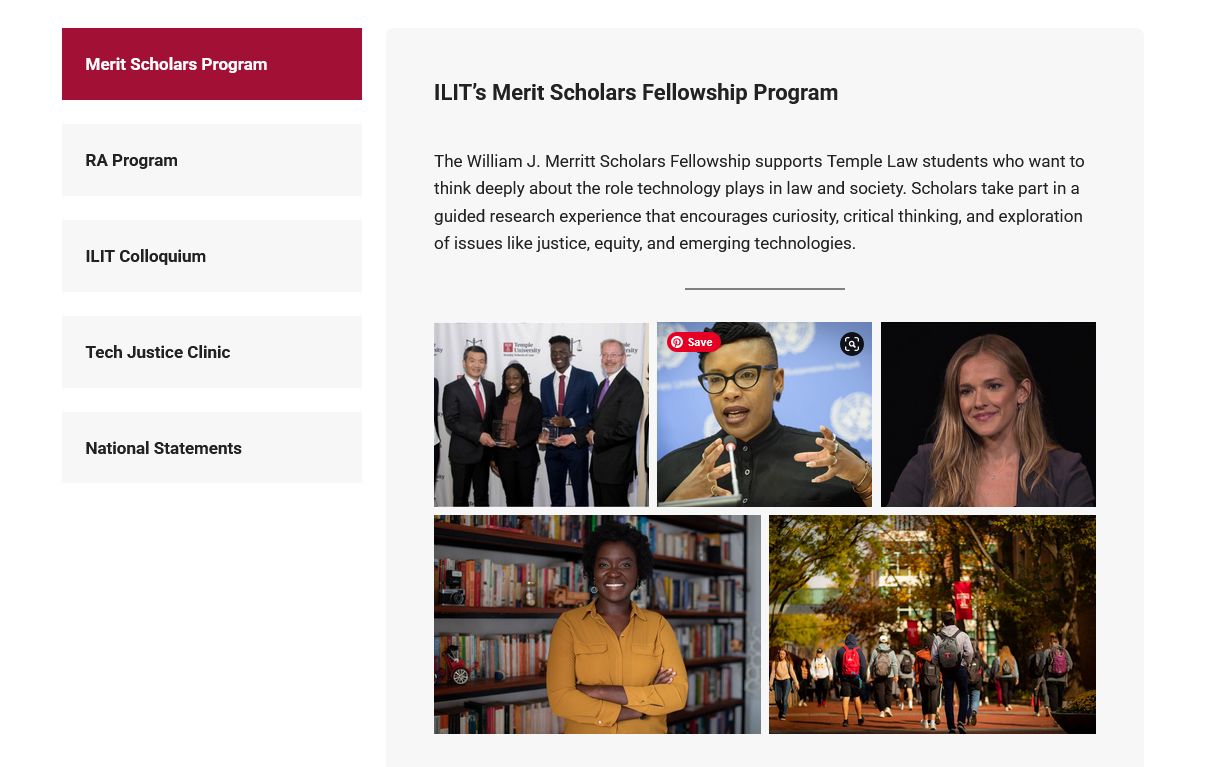
Reusable program layout pattern combining persistent secondary navigation with a flexible content area designed to support varied program needs within the CMS.

This layout pattern was designed to be reused across multiple iLIT programs, providing consistent navigation while allowing each program’s content to vary in length, media, and structure. The left-side navigation helps users move between related programs without losing context, while the main content area supports a mix of text, images, and dynamic content such as publications. By standardizing this pattern, the design reduced cognitive load for users and simplified content updates for non-design stakeholders working within WordPress.

Consistent secondary navigation and predictable content structure support accessible navigation and help preserve usability as content is updated within the CMS.

Accessibility Considerations

Accessibility was treated as a core design requirement rather than a separate phase. UI decisions emphasized clear heading structure, consistent navigation patterns, and layouts that could be understood and navigated using assistive technologies. Typography, spacing, and contrast were chosen to support readability across devices and content variations.

Special attention was given to how accessible patterns would hold up within the CMS, particularly when content was updated by non-design stakeholders. By relying on predictable layouts, clear hierarchy, and flexible components, the interface reduced the risk of accessibility regressions over time while supporting inclusive use across a range of needs and abilities.

CMS & Implementation Constraints

All UI work was designed to function within the constraints of a WordPress CMS and existing technical patterns. Layouts and components needed to be flexible enough to support frequent content updates while remaining stable and predictable when edited by non-design stakeholders.

Rather than relying on highly customized layouts, the approach emphasized reusable patterns, sensible defaults, and guardrails that reduced the likelihood of broken layouts or inconsistent presentation. These decisions helped ensure that the interface could scale with evolving content needs without requiring constant design or development intervention.

Outcomes

This phase resulted in a set of consistent, accessible layout patterns that supported iLIT’s content across multiple programs while remaining manageable within a WordPress CMS. Program pages became easier to navigate and scan, with clearer hierarchy and more predictable structure for both first-time visitors and returning users.

From an internal perspective, the reusable layouts reduced ambiguity around how new content should be added or updated, helping non-design stakeholders maintain the site with greater confidence and consistency over time. These patterns established a stable foundation that could support ongoing growth without requiring continual design intervention.

What I'd Do Next

With more time and iteration, the next phase would focus on validating and refining these patterns through lightweight usability testing and ongoing content audits. This would help identify where layout patterns could be simplified further, where accessibility guidance might be reinforced, and where additional guardrails could support content editors over time.

I would also explore documenting these components and layout patterns more formally to support long-term consistency, onboarding, and cross-team collaboration as the site continues to evolve.